Feature Guide
Your whole stream on one screen.
The Live Cockpit is the streamerOS Dashboard — the screen you keep open while you’re live. Chat sorted into tabs, Super Chats totalled, your most active chatters, a local AI read on the mood of the room and your OBS scenes, side by side. It all runs on your own PC.
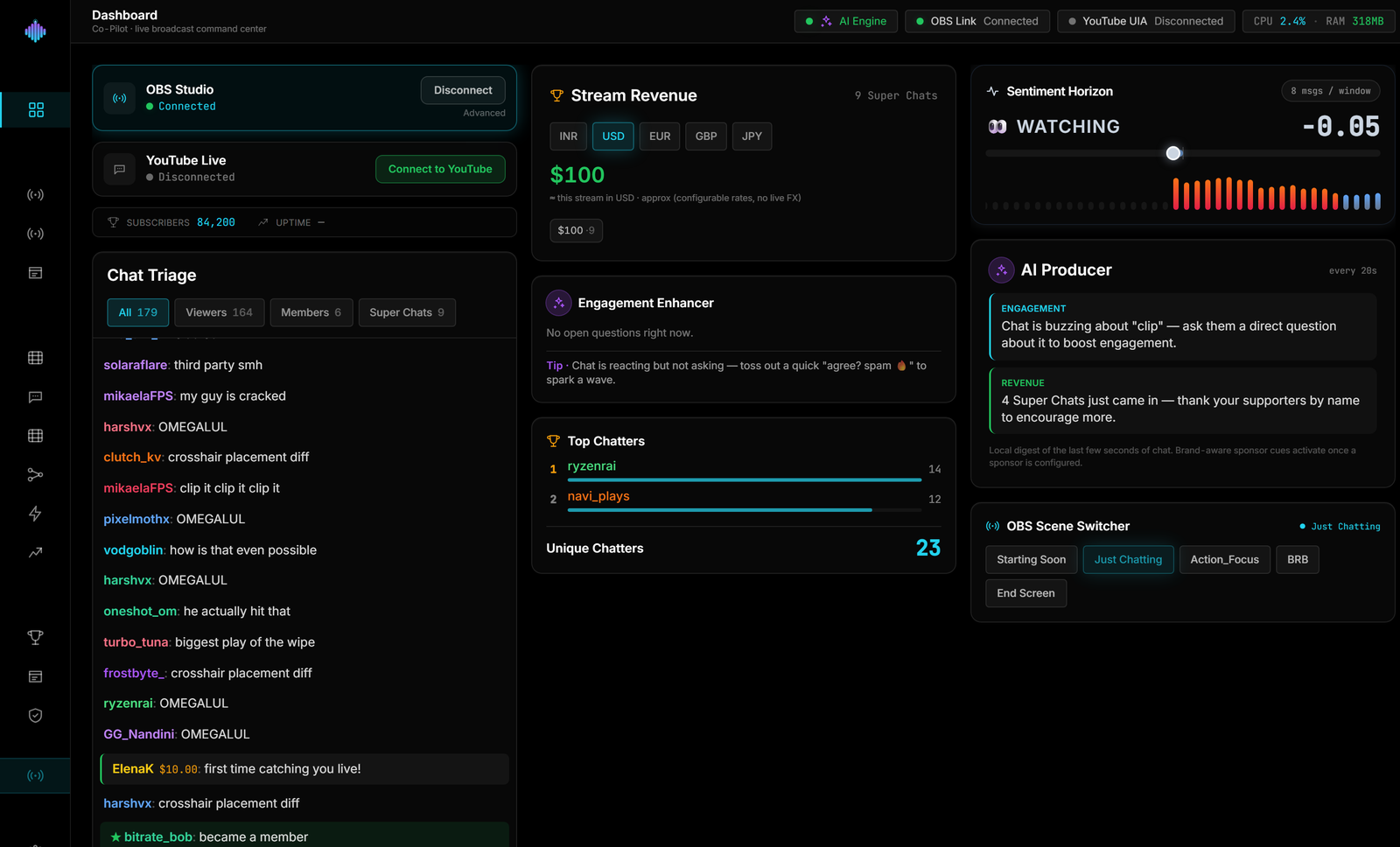
Six panels. One screen.
The things you’d otherwise juggle between OBS and a browser full of chat tabs, laid out where you can see them at a glance.
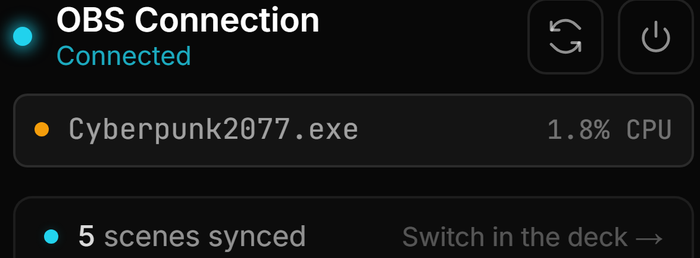
Command Center
One click to connect OBS, with your YouTube chat status right beside it.
Chat Triage
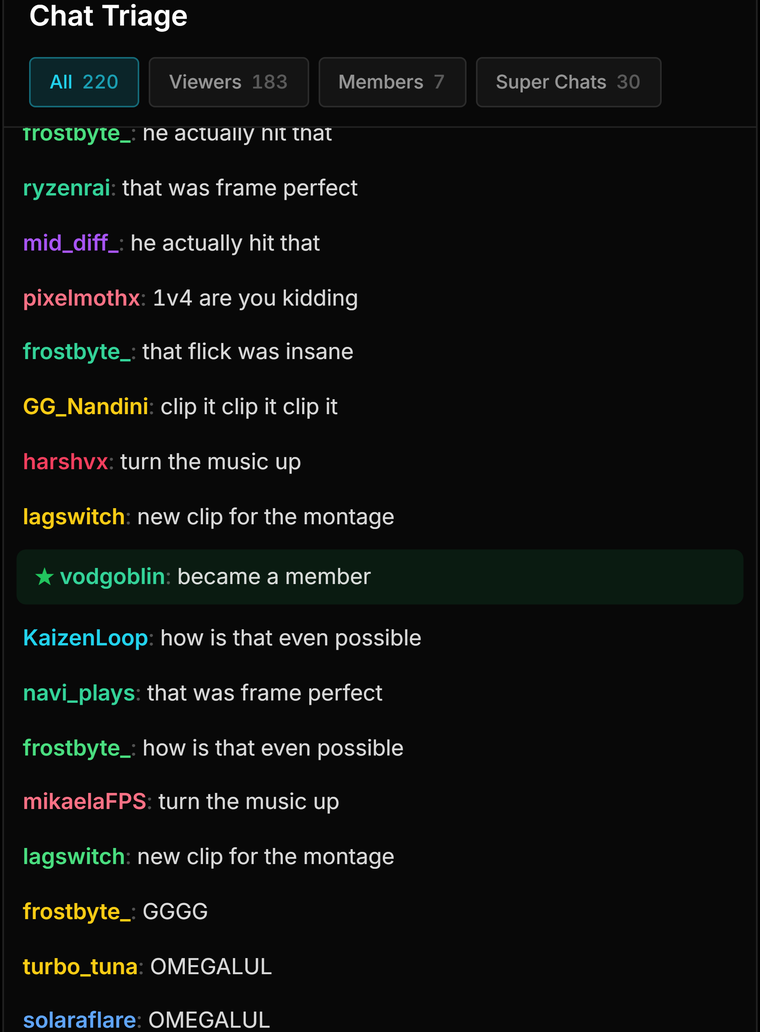
One chat block with All, Viewers, Members and Super Chats tabs, each with a live count.
Stream Revenue
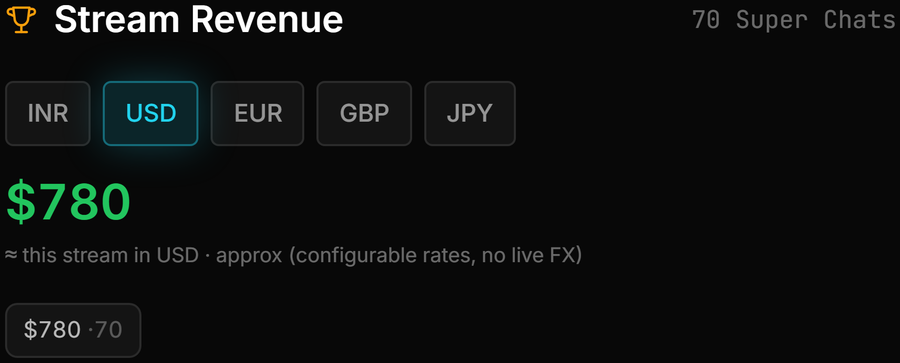
Every Super Chat recorded on your PC and totalled per currency.
Top Chatters
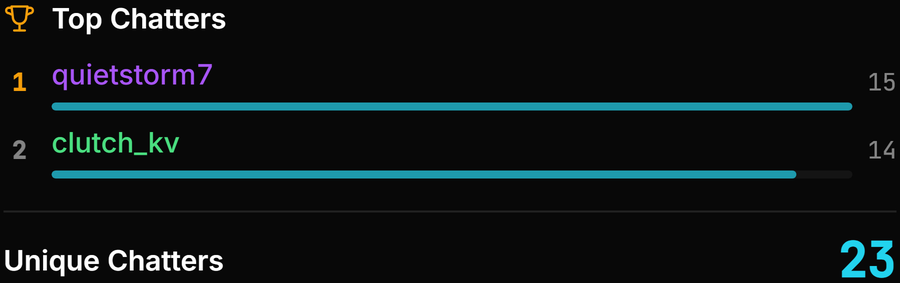
Your two most active chatters this stream, and how many people are talking.
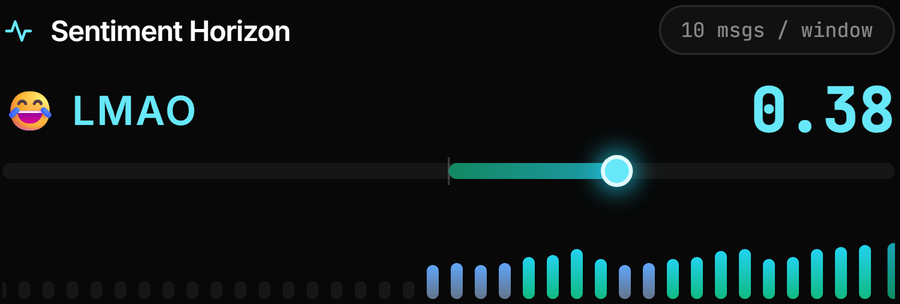
Sentiment Horizon
A local AI read on the room, from toxic to hype, updated every second.
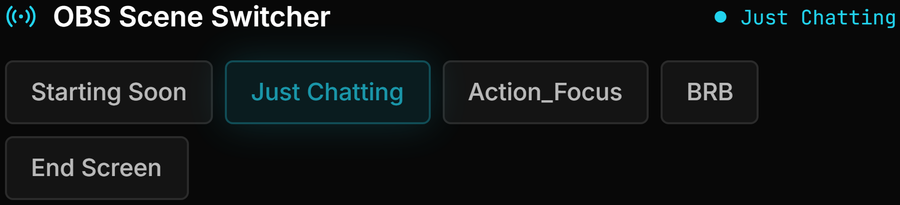
OBS Scene Switcher
Your OBS scenes in a list, the live one highlighted, one click to switch.
Run the stream from the Dashboard in four steps.
Connect → Triage → Spot your regulars → Switch scenes. Revenue and sentiment get their own sections below.
Step 1 · Connect
Connect OBS and bring in chat.
The Command Center sits at the top of the Dashboard. One click connects OBS over WebSocket v5 on the same PC, and your YouTube chat status is right beside it. YouTube Live chat is read from the chat window in your own browser using Windows UI Automation — no API key, no Google sign-in. Twitch chat comes in through an anonymous, read-only connection with no login.
Command Center
Step 2 · Triage
Read chat one tab at a time.
Chat Triage is a single chat block with four tabs — All, Viewers, Members and Super Chats — each with a live count, so you can jump to just the Super Chats between rounds. Regular viewer messages pass a local moderation filter that hides toxic and spam lines; member messages and Super Chats always come through. It follows the newest message, stops when you scroll up to read, and picks back up when you return to the bottom.
Following latest
pixelpanda: that clutch was clean
nightowl_gg: 12 months already, let's go
rahul.plays₹500.00: GG bhai, next match on stream?
mira_draws: rank up tonight?
Step 3 · Spot your regulars
See who is actually talking.
Top Chatters ranks the two most active chatters this stream by message count, shows how many different people have chatted, and lines up chips for the people who chatted most recently — handy for a shout-out without scrolling back through chat.
This stream
Step 4 · Switch scenes
Change scenes without leaving the Dashboard.
The OBS Scene Switcher lists your scenes and highlights the one that is live — click another to switch. The highlight refreshes every few seconds, so a change you make directly in OBS shows up here too.
OBS scenes
Stream Revenue
Know what the stream made before you hit End.
Every Super Chat is recorded to a local SQLite ledger on your PC as it lands. If the same one comes through twice, it only counts once.
- Exact totals for each currency — ₹, $, €, £ and ¥ are recognised by symbol.
- A combined total in the display currency you pick, clearly labelled as approximate.
- Conversion uses exchange rates you set in Settings. The bundled defaults include 1 USD ≈ ₹83, 1 EUR ≈ ₹90 and 1 GBP ≈ ₹105. They stay fixed until you change them — there is no live exchange-rate lookup.
- Nothing is uploaded. The ledger lives on your own disk.
Streaming to an Indian audience? See how ₹ revenue and Hinglish chat work in streamerOS for Indian streamers.
Exact, by currency
Sentiment Horizon
Read the mood of chat at a glance.
A local AI model, running in Ollama on your own PC, reads chat in batches about every two seconds and scores the room from −1 (toxic) to +1 (hype), with a short label like 🔥 HYPE or 😂 LMAO.
- Updates once a second, holding the last score between readings so the bar glides instead of flickering.
- Understands Hinglish — “Bhai sahi hai” reads as positive.
- When chat is flying, it scores an evenly spread sample of up to 40 messages from each window.
- If Ollama is offline, you see an “Ollama offline” banner and a neutral reading — never a made-up score.
Needs Ollama and a model installed; an RTX 3060-class GPU is recommended for the local AI features. Sentiment can also drive Auto-Hype Director rules, and Viral Moments marks the hype spikes for your editor.
Works with the rest of streamerOS.
The chat and signals on the Dashboard feed straight into these.
Frequently asked questions.
Do I need a YouTube API key or a Google sign-in to see my chat?
No. streamerOS reads YouTube Live chat locally from the chat window open in your own browser, using Windows UI Automation — no API key and no Google sign-in. Twitch chat comes in through an anonymous, read-only connection, so there is no Twitch login either.
Will Chat Triage hide messages I actually want to see?
Only regular viewer messages go through the moderation filter, which hides toxic and spam lines and shows a small count of how many it filtered. Member messages and Super Chats are always shown. The filter runs on your PC — no message is sent anywhere to be checked.
How accurate is the Super Chat total?
The per-currency totals are exact: every Super Chat is written to a ledger on your PC, and duplicates are ignored. The combined total is an approximation. It converts each currency with exchange rates you set in Settings (bundled defaults such as 1 USD ≈ ₹83), and there is no live exchange-rate lookup, so update the rates if you want that figure to follow the market. It recognises ₹, $, €, £ and ¥ — a Super Chat in any other currency is still recorded, but left out of the converted total.
Does Sentiment Horizon send my chat to an AI service?
No. It uses a local AI model running in Ollama on your own PC, at 127.0.0.1, so chat never leaves the machine. If Ollama is not running, the panel shows an "Ollama offline" banner and a neutral reading instead of guessing a score.
What do I need to run the Live Cockpit?
A 64-bit Windows 10 or 11 PC and OBS Studio with OBS WebSocket v5 on the same machine for the Scene Switcher. Sentiment Horizon also needs Ollama with a model installed, and an RTX 3060-class GPU is recommended for the local AI features. Chat Triage, Stream Revenue, Top Chatters and the Scene Switcher do not use the AI model.
Will the Cockpit slow down my stream?
The core streamerOS app holds a 1.8% CPU footprint under a live 1080p60 game. That figure is for the core app: the AI model behind Sentiment Horizon runs separately in Ollama, which is why an RTX 3060-class GPU is recommended if you use it.
What still works after the 7-day trial?
streamerOS is free for 7 days, then $29 once. The live monitors and OBS control that act during a stream are part of the $29 licence. Your recorded stream data stays readable for free — an expired trial never hides or deletes it.
More questions answered on the full FAQ.
The actual app
Every panel on the Dashboard.
Chat, Super Chat revenue, the mood of the room and your OBS scenes, captured from the app.

Run the whole stream from one screen.
The Live Cockpit ships at launch in February 2027, running on your own PC. Free for 7 days, then $29 once.
Launching February 2027