For low-end PCs
Every frame your game can get.
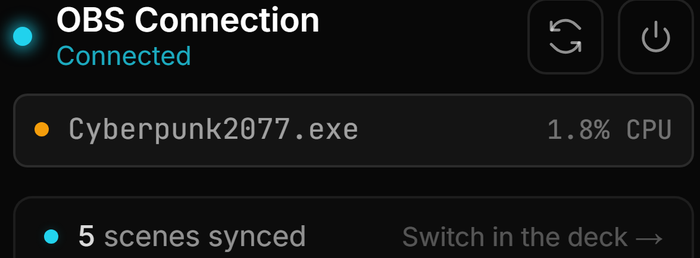
Most stream tools are web apps in a costume: a whole browser engine running next to your game. streamerOS is a Rust desktop app that holds a 1.8% CPU footprint under a live 1080p60 stream.
Where the frames actually go
You tuned your encoder, dropped to 900p, turned off every OBS source you could live without — and the stall is still there when chat gets busy. The usual culprit is not OBS. It is the stack of helper apps beside it, each one shipping its own copy of Chromium to render a dashboard you look at twice an hour.
A browser engine costs you hundreds of megabytes of RAM and a steady slice of CPU whether you are looking at it or not. On a machine with headroom you never notice. On a modest one it is the difference between a clean VOD and encoder overload at the exact moment your chat reacts to something.
streamerOS is built in Rust with Tauri, which uses the WebView already in Windows rather than bundling a second browser. That is the whole trick, and it is why the cockpit sits at 1.8% CPU with a game running.
1.8% CPU under a live game
Measured with a 1080p60 stream running and a game in the foreground. The OBS Connection card shows the number live, so you are not taking our word for it.
No second browser engine
Rust and Tauri, using the Windows WebView. There is no bundled Chromium quietly holding memory while you play.
No cloud round-trip
Chat is read and scored on your machine, so a scene switch fires at local speed instead of waiting on a server in another country.
Nothing running in the background
Close the app and it is gone. There is no helper service left behind to wake up during your next stream.
The actual app
What the footprint looks like
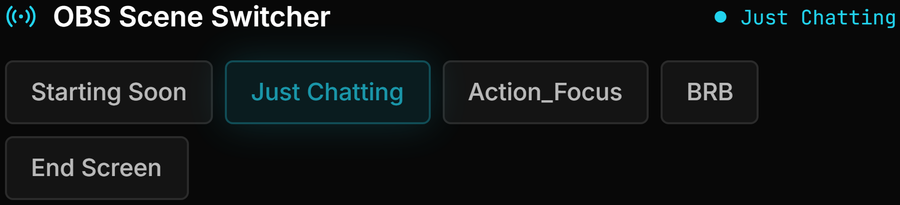
Real captures from the running app, including the live CPU figure under a game.



What this will not fix
A light cockpit helps at the margin. It does not turn a machine that is already struggling into one that is not, and we would rather you knew that before paying:
- If OBS and your game are already fighting for the CPU before any companion app is running, streamerOS saves you what the other app was costing — not more.
- The published requirements are Windows 10 or 11 with 16 GB of RAM and 8 cores. Most of that headroom is for your game and OBS, not for streamerOS, but it is the configuration it is tested against.
- The local AI features — chat sentiment, the AI Sidekick, Brand Guard — run models on your own machine and want an RTX 3060-class GPU. On weaker hardware you can run the cockpit and the automation, but those features are out of reach.
- It is Windows only. There is no macOS or Linux build, and none planned for v1.0.
- It cannot fix a bad upload. If your bitrate is dropping frames on the network side, no local app changes that.
The trust page carries the rest of the caveats, including what cannot be verified before launch, and the comparisons say where a free alternative is the better answer.
Frequently asked questions.
Will streamerOS run on 8 GB of RAM?
The tested configuration is 16 GB, because OBS and a modern game will use most of it before streamerOS starts. The cockpit itself is small — it is a Rust app using the Windows WebView rather than a bundled browser — but we publish 16 GB because that is what we test, and we would rather state the requirement than have you find out mid-stream.
Is the 1.8% CPU figure real?
It is measured with a 1080p60 stream live and a game in the foreground, and the app shows its own current figure on the OBS Connection card while you use it. Your number will vary with your hardware and how many automation rules you run.
Do I need a good GPU?
Only for the local AI features. Chat sentiment, the AI Sidekick and Brand Guard run models on your machine through Ollama and want an RTX 3060-class card. The cockpit, OBS control, scene automation, clip library and chat archive do not use the GPU.
Why is this lighter than other stream tools?
Most are Electron apps, which bundle an entire Chromium browser to draw their interface. streamerOS is built in Rust with Tauri, which uses the WebView already present in Windows. That removes a browser engine from your machine during every stream.
More questions answered on the full FAQ.
Give the machine back to the game
streamerOS v1.0 arrives in February 2027 for Windows 10 and 11.
Pre-register and your trial is 3 months instead of 7 days